What you'll learn: By the end of this lesson you will be able to explain what system design is and ask the three questions that start every design. You will name the parts of a typical web architecture and say what each one is for. You will pick the right scaling technique for a given bottleneck, and you will know where the rest of this course goes from here.
Think of a restaurant. A tiny café can run on one cook, one till and a handwritten order pad. Now imagine the same café has to feed ten thousand people at lunch. You cannot just hire a faster cook. You need a kitchen layout, stations, a queue for orders, a plan for what happens when the fryer breaks, and a way to know the walk-in fridge is running low before it runs out.
System design is that kind of planning for software. It is the work of deciding which parts a system has, how they talk to each other, where data lives, and how the whole thing behaves when it is busy or when something breaks. Code answers "how does this function work?" System design answers "how do these twenty things work together, and still work next year?"
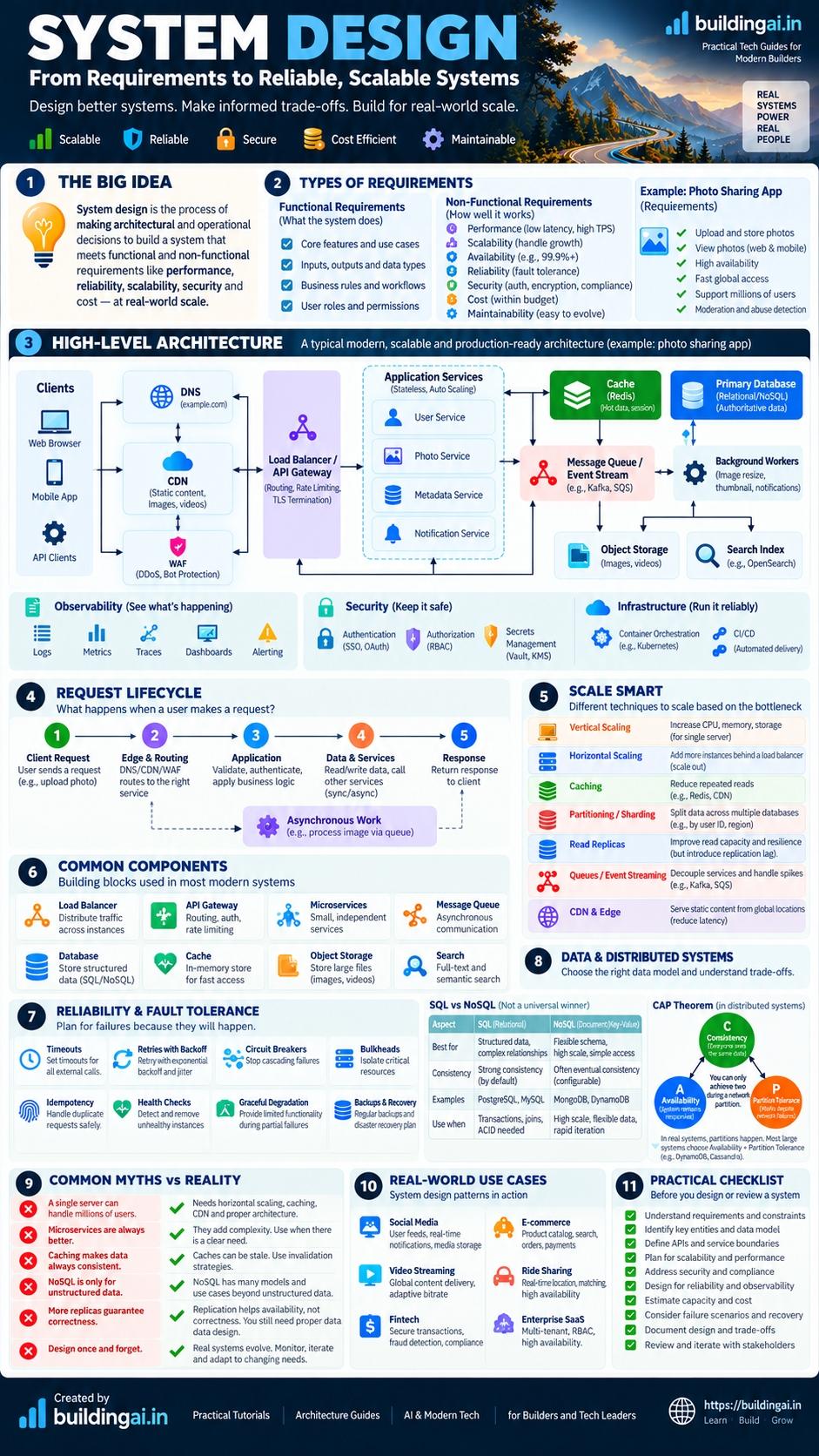
Open the full-size cheat sheet. Everything on it is explained in text below, so you can search and copy it.
The core idea
Every system design starts from three questions. Answer them in order, and most of the design falls out.
- What must it do? These are the functional requirements: the features. "Users upload photos, follow other users and see a feed."
- How well must it do it? These are the non-functional requirements: speed, availability, durability, security, cost. "The feed loads in under half a second. Photos are never lost."
- At what scale? How many users, how many requests per second, how much data, and how fast is that growing? "Ten million users, mostly reading."
The same feature list can lead to wildly different designs depending on questions two and three. A photo app for a family of five and one for ten million people share a feature list and almost nothing else. Skip these questions and you will build something that falls over, or something absurdly over-built that costs ten times more than it should.
This lesson is a map. The course's running example is a photo-sharing app (users upload photos, follow each other, scroll a feed), and the "In practice" section near the end uses a different, more everyday product: a grocery-delivery app having a bad day. Later lessons go deep on every idea met here.
A tour of a typical architecture
Here is the shape most web products grow into. Not every product needs every box, and a small product should start with far fewer.
How to read it: the edge is what the user touches, the application tier is the code you write, and the data and async tiers hold state and do slow work.
| Box | What it is for |
|---|---|
| Clients | Phones and browsers. Outside your control, and can be slow, offline or hostile. |
| DNS | The internet's phone book: turns photos.example.com into an IP address. |
| CDN | Servers around the world that keep copies of static files near users, so an image comes from a nearby edge instead of your home region. |
| WAF | A web application firewall that filters obviously malicious traffic. |
| Load balancer or gateway | Spreads requests across application copies. A gateway also handles authentication and rate limiting at the door. |
| Application services | Your business logic. Ideally stateless: nothing important lives only in one instance's memory, so you can add more of them. |
| Cache | Fast temporary memory (Redis, Memcached) holding hot data so you skip the database. |
| Primary database and replicas | The source of truth, plus read-only copies that share the read load. |
| Message queue and workers | Slow work (thumbnails, emails, abuse scans) is dropped on a queue and done later, so users do not wait. |
| Object storage | Cheap, durable storage for big files such as photo bytes (Amazon S3 and compatible services). |
| Search index | Answers "find photos tagged sunset" far better than a table scan. |
Start with the smallest design that meets your requirements. A single application server, one database and object storage run a surprising number of real products. Add each box only when a specific problem asks for it.
The request lifecycle in five steps
When someone opens the app and loads their feed, roughly this happens. The Request Lifecycle lesson walks through every step.
- Resolve. The client asks DNS for your service's address. Answers are cached along the way.
- Connect. The client opens a connection and sets up encryption (TCP is the reliable connection, TLS the encryption on top). Doing this repeatedly is expensive, so connections are reused.
- Route. The CDN may answer static content. Everything else passes the firewall to the load balancer, which picks a healthy instance.
- Compute. The application checks identity, looks in the cache, queries the database if needed, and may queue slow work.
- Respond. The response travels back, and parts of it are cached for next time.
Almost every performance and reliability question is really a question about one of these steps: which is slow, which can fail, and which can be skipped by reusing earlier work.
Scaling: how a system grows
Scaling means handling more load without falling over. There are only a handful of techniques, and the skill is choosing the one that fits the actual bottleneck.
| Technique | What it does | Use it when | Cost or catch |
|---|---|---|---|
| Vertical scaling | Use a bigger machine | The system is small and you want the quickest fix | Hits a ceiling; one big machine is a single point of failure |
| Horizontal scaling | Run more copies behind a load balancer | The application tier is the bottleneck and is stateless | Needs stateless design and more operations |
| Caching | Keep repeated answers in fast memory | Reads dominate and many ask for the same data | Stale data; invalidation is hard |
| Read replicas | Copy the database to serve reads | The database is read-heavy | Replicas lag slightly behind the primary |
| Partitioning (sharding) | Split data across databases by a key | One database cannot hold the data or absorb the writes | Cross-shard queries get hard; resharding is painful |
| Queues | Move slow work out of the request path | Work can happen later, or traffic is bursty | Results are eventual; you must handle retries and duplicates |
The order matters, and measurement comes first. This flowchart is the order most products follow.
How to read it: follow the first "yes" from the top. The cheap, reversible fixes sit near the top and sharding sits at the bottom because it is the hardest to undo.
Scale the bottleneck, not the whole system. If the database is the problem, ten more application servers make things worse by sending it more queries.
Reliability: assume things break
Servers crash, networks drop packets, disks fail, and dependencies get slow. In a system with many parts, something is always failing somewhere. Fault tolerance means the system keeps working, perhaps in a reduced way, anyway. The core tools:
- Timeouts. Never wait forever for another service; a call with no timeout can pin a thread until the whole service stops.
- Retries with exponential backoff and jitter. Retry after a growing, randomised delay so many clients do not retry at the same instant.
- Circuit breakers. If a dependency is clearly failing, stop calling it for a while and fail fast.
- Idempotency. Make doing an operation twice equal doing it once, so retries are safe. "Set the profile photo to X" is idempotent. "Add one dollar" is not, unless you attach a unique request key.
- Bulkheads. Isolate resources (separate thread pools per dependency) so one failing part cannot drain everything.
- Health checks. Let the load balancer ask each instance "are you OK?" and skip unhealthy ones.
- Backups. Copies in another place, with restores you have actually tested. A backup you have never restored is a hope, not a plan.
Unbounded retries amplify outages. If a struggling database is slow and every client immediately retries three times, the load can quadruple exactly when it can least cope. Cap retries, back off, and add jitter.
Data: SQL, NoSQL and CAP in brief
| Option | Strong at | Watch out for |
|---|---|---|
| Relational (PostgreSQL, MySQL) | Structured data, joins, transactions, flexible queries | Scaling writes past one machine takes real work |
| Key-value (Redis, DynamoDB-style) | Very fast lookups by key, simple scaling | Limited querying beyond the key |
| Document (MongoDB) | Flexible records read as a whole | Joins across documents are awkward |
| Wide-column (Cassandra) | Huge write volumes across many nodes | Tables are designed around queries up front |
"NoSQL" is not one thing and not a badge of scale. Many relational databases handle very large workloads. Choose by access pattern and consistency needs, not fashion.
When data is copied across machines you meet the CAP theorem. Stated precisely: during a network partition (some machines cannot reach others) a system must choose between consistency (every read sees the latest write) and availability (every request still gets an answer). Partitions are a fact of networks, so the real question is what to do when one happens. See CAP and Consistency.
Security and operations
Two topics beginners leave to the end and regret it. For security: authenticate (who are you?) and authorise (what may you do?) separately, encrypt traffic with TLS and sensitive data at rest, give each service minimum permissions, validate every input, keep secrets out of code, and rate-limit to blunt abuse. Each layer assumes the one before might fail, which is called defence in depth.
For operations: a system you cannot see is a system you cannot fix. Use logs (what happened), metrics (numbers over time) and traces (one request's path through many services). Set an SLO (service level objective), such as "99.9% of feed requests succeed", and alert when you are burning through it, not on every blip.
Myths versus reality
| Myth | Reality |
|---|---|
| Microservices always scale better | They let teams deploy independently but add network calls, failure modes and cost. A well-structured monolith scales a long way. |
| More replicas guarantee correctness | Replicas add availability and read capacity. Asynchronous replicas can serve stale data. |
| Caching is always safe | A cache can serve stale data, hide bugs, and cause stampedes when entries expire together. |
| NoSQL is only for big companies | It is a family of tools for particular data shapes; size is one factor among several. |
| You design once and you are done | Requirements and load change; designs are revisited as the real bottleneck appears. |
| Retries solve every failure | They help brief glitches, worsen some failures, and are dangerous on non-idempotent operations. |
In practice: a grocery-delivery app on its first big promo day
A realistic scenario, not a case history. This is a composite example built from common production patterns. It does not describe any specific company, and every number in it is an illustrative assumption.
The situation
A regional grocery-delivery app serves one metro area. Six engineers run it, and the budget is small: no dedicated operations person. The stack is a Spring Boot monolith on one virtual machine behind Nginx, with PostgreSQL on a second machine. Product photos are served from the application's own disk.
Marketing plans the first big promotion. At 12:00 a push notification goes to 150,000 installed devices. Assume 5% open the app in the first ten minutes, which is 7,500 people at about 40 requests each: 300,000 requests in 600 seconds, or about 500 requests per second on average, with the first minutes roughly three times higher (an expected peak of about 1,500 requests per second). An earlier load test showed the single server degrading past about 150 requests per second. The pain on a normal Friday already shows: catalogue p95 latency around 1.2 seconds, and the application VM's CPU near 70%.
Starting architecture
How to read it: everything shares one machine's CPU and network, including photo bytes and notification calls made while the customer waits.
Options considered
| Option | What it fixes | What it costs | Risk |
|---|---|---|---|
| Do nothing, or only a bigger VM | CPU headroom for a while | Cheap and fast | Still one machine; the database and photo bandwidth still limit; one crash is an outage |
| Offload and scale out: photos to object storage plus CDN, Redis cache for the catalogue, several stateless app instances behind a load balancer (three to start, more if the load test says so), receipts via a queue | Photo bandwidth, repeated reads, CPU, slow inline calls | A few weeks of work and a few new components to run | Cache and session mistakes; more to monitor |
| Split into microservices on Kubernetes with a sharded database | Everything in theory | Months, and a platform skill the team lacks | Far more failure modes than the problem needs |
The decision
| Field | Record |
|---|---|
| Context | One promo day in six weeks. Load is spiky, read-heavy and mostly the same catalogue pages. Team of six. |
| Decision | Take the middle option. Keep a single PostgreSQL primary, fronted by a connection pooler (PgBouncer). Keep the monolith as one codebase. |
| Consequences | Good: each change is small and reversible; photos stop competing with API traffic. Bad: the database is still a single point of failure, and the cache adds a staleness question for prices. |
| Revisit when | Database CPU stays above 60% at normal load, or p95 checkout latency breaks 800 ms for a week. Then consider a read replica. |
Rollout and verification
Ship in that order because each step is independently reversible and earlier steps are the cheapest wins. Put each behind a feature flag where possible, and send 5% of traffic to the new instances first (a canary) before raising it. Run the load test (a tool such as k6 works) up to the expected peak of about 1,500 requests per second and then beyond it for headroom. The single server managed about 150 requests per second, so three instances alone would not be enough: the cache and the photo offload must make each request much cheaper, and the test shows whether more instances are needed. Watch Prometheus and Grafana dashboards: catalogue p95 and p99 latency, 5xx rate, cache hit ratio, CDN offload, database connections in use, and CPU per instance. The target, not a promise: p95 under 500 ms at the expected peak, and no database connection pool saturation.
The 2 a.m. failure
At 02:10 an alert fires: "checkout p95 above 2 s, database connections above 90%". The cause: the Redis node ran out of memory and restarted, losing sessions and the cache, and every catalogue request now goes straight to PostgreSQL.
The first three checks: Grafana (cache hit ratio dropped to zero), redis-cli INFO stats (keyspace hits and misses, evicted_keys), and in psql SELECT state, count(*) FROM pg_stat_activity GROUP BY state; to see how many connections are stuck. Mitigation: bring Redis back, then use a flag to serve a short-lived static catalogue snapshot so the database is not hit by every request. Follow-up fixes: split sessions from the cache so one failure does not log everyone out, set a maxmemory policy and an alert on memory, add request coalescing so a cold cache does not stampede, and add a cache-hit-ratio alert.
Architect's notes
- Measure before you buy. The load test number (about 150 requests per second) decided more than any diagram did. Get that number before the design meeting.
- Ask in the design review: what happens when each new box is down? Every added component is a new way to fail, and the Redis outage above is the price of the cache.
- Do the cheap, boring wins first. Photo offload and a CDN remove load at comparatively low risk.
- Name an owner and a pager. A component with no owner (who restarts Redis at night?) is a failure waiting for the worst hour.
- Defer sharding and microservices. Write the trigger (database CPU, p95 latency) in the decision record and let the numbers, not enthusiasm, call it.
A practical checklist
- Write the functional requirements and what is out of scope.
- Write the non-functional requirements with numbers.
- Estimate load: requests per second, storage, bandwidth.
- Sketch the API and the main data model.
- Draw the simplest high-level design that works.
- Find single points of failure and the likely bottleneck.
- Add caching, queues and partitioning only where the numbers demand.
- Add timeouts, retries, health checks, backups and monitoring.
- Check authentication, authorisation, encryption and abuse limits.
- Write down the trade-offs and what would make you revisit them.
Course roadmap
This is the first of three courses, each assuming the one before. See all three, the cheat sheet and the case studies on the System Design learning path.
Course 1: System Design Foundations (no prior knowledge needed)
- System Design: The Big Picture: this lesson.
- Requirements: turn a vague idea into scope and measurable goals.
- Estimation: back-of-the-envelope maths for load, storage and bandwidth.
- The Request Lifecycle: what happens between a click and a response.
- API Design: contracts, pagination, idempotency and versioning.
- Load Balancing: spreading traffic and surviving failures.
- Scaling Basics: vertical versus horizontal, and finding the bottleneck.
- Caching Basics: cache-aside, TTLs and eviction.
- Databases Basics: relational and NoSQL, indexes and transactions.
- CDN and Object Storage: serving files and media well.
- Reliability Basics: redundancy, retries and graceful degradation.
- A Repeatable Approach: a framework for any design problem.
Course 2: Building Blocks starts at Building Blocks Overview. It covers replication, sharding, consistency, advanced caching, queues, event streaming, architecture styles, gateways, rate limiting, search, storage engines, observability and security.
Course 3: Advanced starts at Advanced Overview. It covers distributed transactions, CQRS and event sourcing, consensus, clocks and ordering, resilience patterns, multi-region design and capacity planning, then full case studies including Photo Sharing.
Common mistakes
- Designing before asking. A diagram without requirements answers the wrong question. Fix: spend the first minutes on the three questions.
- Over-building on day one. Microservices, sharding and a message bus for a hundred users burn time and add failure modes. Fix: start simple and add parts when numbers justify them.
- Scaling the wrong thing. More application servers when the database is the bottleneck wastes money and can worsen the outage. Fix: measure first.
- Ignoring failure. Happy-path-only designs fail in production. Fix: for every box ask "what if this is slow, down or returns garbage?"
- Treating a cache as a database. If the only copy is in a cache, one restart loses it. Fix: keep a durable source of truth.
- Untested backups. Finding corrupt backups during an incident is too late. Fix: schedule restore drills.
- Skipping numbers. "A lot" and "fast" drive no decisions. Fix: use rough numbers labelled as assumptions.
Key takeaways
- Three questions first. What must it do, how well, and at what scale; most choices follow.
- Start small. The simplest design that meets the requirements is usually the right first design.
- Stateless tiers scale out. Keep application servers free of local state so you can add copies behind a load balancer.
- Match technique to bottleneck. Caching, replicas, queues and sharding each solve a different problem at a different cost.
- Failure is normal. Timeouts, capped retries with backoff and jitter, circuit breakers, health checks and tested backups are baseline.
- Idempotency makes retries safe. Design operations so a repeat does no extra harm.
- CAP is about partitions. During a partition you choose consistency or availability; otherwise you trade latency against consistency.
- Designs evolve. Revisit assumptions as real traffic shows where the bottleneck is.
Practice exercises
Exercise 1 — Starter (30 min): Pick an app you use daily, such as a music or messaging app. Write three functional requirements, three non-functional requirements and one guess at its scale. Then redraw the architecture diagram in this lesson with only the boxes you think that app really needs.
Exercise 2 — Intermediate (2 hours): For the photo-sharing app, list five things that could fail (for example, the thumbnail worker crashes or the database primary is down). For each, write what the user sees today, which reliability technique would help, and what it costs. Present it as a table.
Exercise 3 — Advanced (half day): Imagine the photo app grows from ten thousand to ten million users. Using the scaling table, write the order in which you would apply the techniques, and for each step the specific metric that would trigger it. Then argue against yourself: name one step you could reasonably skip, and one signal that would prove you wrong.
Related reading
- Requirements - the next lesson, where the three questions become concrete, measurable goals.
- The Request Lifecycle - a closer look at the five steps from click to response.
- Reliability Basics - the failure-handling techniques from this lesson in depth.
- Photo Sharing case study - the running example designed end to end in the advanced course.
- Notification service design - a worked example of a real design problem from the blog.