Download the full-size infographic
What you'll learn: how a record travels through Confluent Kafka, from the producer to the partition log to a consumer group; what actually protects your data (acks, replication,
min.insync.replicas, idempotence); where exactly-once stops being true; which Confluent services belong to Confluent Cloud and which to self-managed Confluent Platform; and how to onboard Confluent Cloud on AWS and publish a first message from Spring Boot.
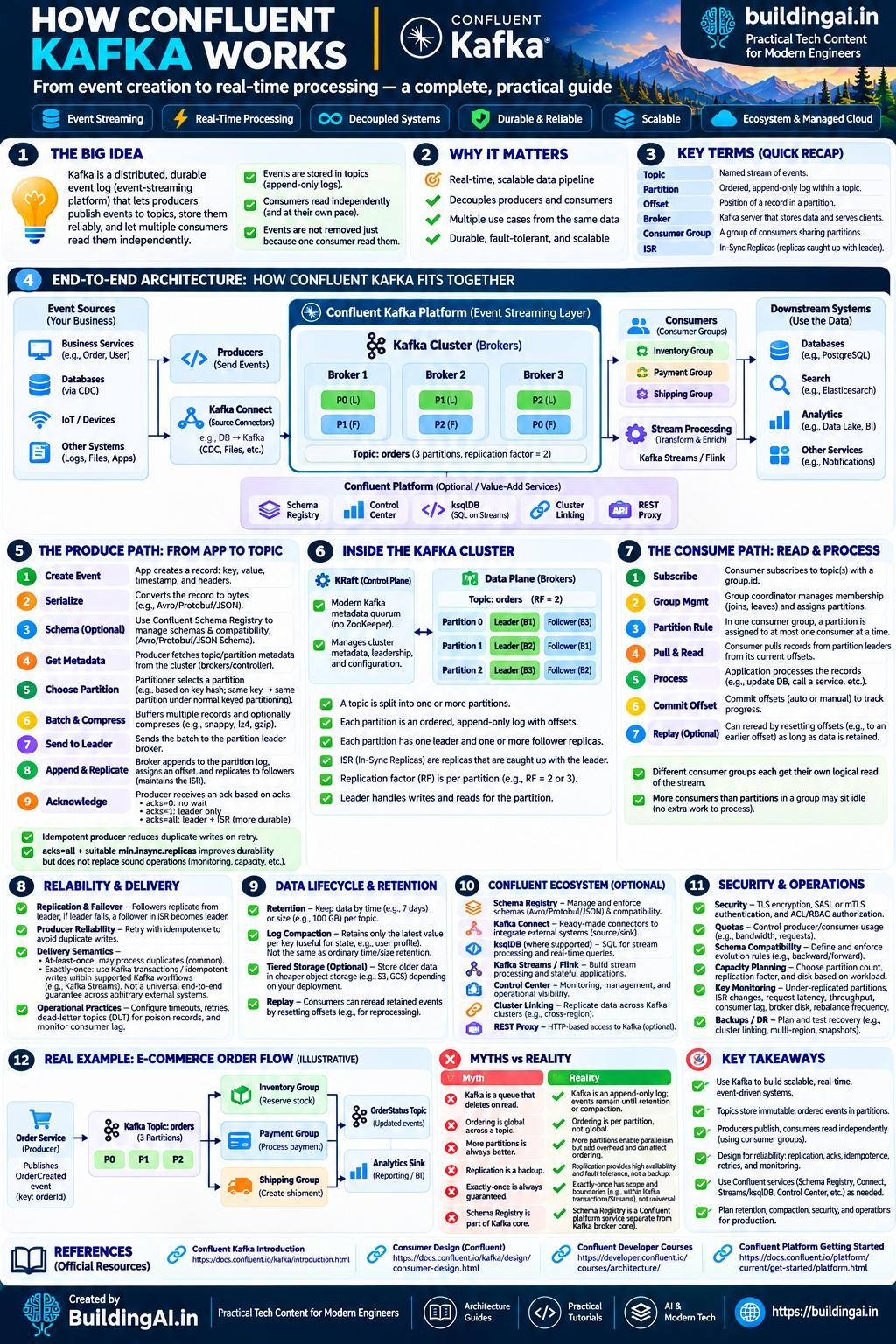
This guide turns two infographics into a full walkthrough: how Confluent Kafka works end to end, and how to onboard Confluent Cloud on AWS and publish a message. Everything in the pictures is also in the text and tables below, so it is searchable and screen-reader friendly. Where an infographic was loose, the article follows the official documentation. For the tuning side, read Kafka Scalability Patterns afterwards.
1. The big idea
Kafka is a distributed, durable event log. Producers append events to named topics, Kafka stores them, and any number of consumers read them independently. Per the Confluent documentation, topics are append-only and events are immutable once written. Three properties explain most of the design:
- Events are stored in topics (append-only logs). Nothing is updated in place.
- Consumers read independently, at their own pace. The only per-consumer state is the offset in each partition.
- Events are not removed because one consumer read them. Unlike a classic queue, a read deletes nothing. Data leaves by retention (age or size) or compaction.
Confluent is the company around Apache Kafka. Confluent Cloud is the fully managed service, built on what Confluent calls the Kora engine. Confluent Platform is software you download and run yourself. Both speak the Apache Kafka protocol, so a standard Kafka client works against either.
2. Why it matters and the key terms
| Why Kafka matters | What it means in practice |
|---|---|
| Real-time, scalable data pipeline | Events flow as they happen, and you scale by adding partitions and consumers |
| Decouples producers and consumers | The order service does not know who reads its events |
| Multiple use cases from the same data | Inventory, payments, analytics and search can all read the same topic |
| Durable, fault-tolerant, scalable | Data is replicated across brokers and survives broker failures |
Quick recap of the key terms:
| Term | Meaning |
|---|---|
| Topic | A named stream of events |
| Partition | An ordered, append-only log within a topic |
| Offset | The position of a record in a partition |
| Broker | A Kafka server that stores data and serves clients |
| Consumer group | A group of consumers that share a topic's partitions |
| ISR | In-sync replicas: the replicas that are caught up with the leader |
The producer writes events and the consumer reads them. For background, see event streaming and CQRS and event sourcing.
3. End-to-end architecture
Event sources (business services, databases through change data capture, IoT devices, logs and files) feed Kafka through producers or Kafka Connect source connectors. Brokers hold the topics. Consumer groups and stream-processing jobs read them, and downstream systems (databases, search, analytics, notifications) receive the results.
Figure 1. End-to-end flow from event sources to downstream systems.
How to read this: packets travel along request and response arrows (producers writing, consumers polling). Dashes show event flow into downstream systems.
The infographic's example cluster has three brokers and a topic orders with three partitions and a replication factor of two. That is an illustration: Confluent's introduction notes that a common production setting is a replication factor of 3.
Around the core sits an optional layer of Confluent services (Schema Registry, a monitoring UI, ksqlDB, Cluster Linking, a REST interface). Section 9 says which are Confluent Cloud features and which are Confluent Platform components.
4. The produce path: from app to topic
| Step | What happens |
|---|---|
| 1. Create event | The app builds a record: key, value, timestamp and optional headers |
| 2. Serialize | The producer converts key and value to bytes (Avro, Protobuf, JSON or plain strings) |
| 3. Schema (optional) | With Schema Registry, the serializer registers or looks up the schema and checks compatibility |
| 4. Get metadata | The producer asks a broker which brokers lead which partitions |
| 5. Choose partition | The partitioner picks a partition. With the default partitioner, records with the same key go to the same partition, as long as the topic keeps the same number of partitions |
| 6. Batch and compress | Records are buffered into batches, optionally compressed (gzip, snappy, lz4 or zstd) |
| 7. Send to leader | The batch goes to the leader broker of the target partition |
| 8. Append and replicate | The leader appends to the partition log, assigns offsets, and followers replicate it |
| 9. Acknowledge | The producer gets an ack according to acks |
Figure 2. Sequence of one produced record with acks=all.
Two details are easy to miss. First, the producer fetches metadata from brokers (any broker in the bootstrap list can answer), not by calling a special controller endpoint. Second, the partitioner only guarantees that equal keys land together. Records without a key are spread across partitions and have no cross-partition order.
The acknowledgment levels, from the Apache Kafka producer documentation:
| Setting | Meaning | Trade-off |
|---|---|---|
acks=0 |
Do not wait for any acknowledgment. Retries do not take effect | Fastest, can lose data silently |
acks=1 |
Wait for the leader only | Data can be lost if the leader fails before followers copy it |
acks=all |
Wait for the leader and the in-sync replicas | Strongest guarantee, slightly higher latency |
In the Apache Kafka 4.1 documentation the default is acks=all and enable.idempotence=true. An idempotent producer gets a producer ID from the broker, and the broker deduplicates retried batches by sequence number, so a retry inside the same producer session does not write the record twice. It does not stop your own application from sending the same event again, or a restarted producer from repeating work. Idempotence needs acks=all, retries above zero and max.in.flight.requests.per.connection of 5 or less. Check the defaults of the client version you actually use, because older clients differ.
acks=all plus a suitable min.insync.replicas improves durability, but does not replace monitoring and capacity planning.
5. Inside the cluster: partitions, leaders, followers, ISR and KRaft
A topic is split into one or more partitions. Each partition is an ordered, append-only log, and every record in it has an offset. Order is guaranteed within a partition, not across the whole topic. (With idempotence off and more than one in-flight request per connection, a retry can reorder records within a partition.)
Replication. The unit of replication is the topic partition. Each partition has one leader and zero or more followers (a replication factor of 1 has none). Writes go to the leader and followers pull from it.
In-sync replicas. A replica drops out of the ISR if it loses its session or falls too far behind (replica.lag.time.max.ms). Only ISR members can become leader, unless unclean leader election is enabled. It is false by default because it can lose data.
When a write counts as committed. A write is not committed until all in-sync replicas have it, and consumers cannot read it before that. With min.insync.replicas (default 1 at broker level) you set how many replicas, including the leader, must be in sync for a write to succeed.
| Replication factor | min.insync.replicas |
acks=all write succeeds while |
Broker failures tolerated for writes |
|---|---|---|---|
| 3 | 2 | at least 2 replicas are in sync | 1 |
| 3 | 1 | the leader is alive | 2, but data can be lost if the leader then fails |
| 2 | 2 | both replicas are in sync | 0 (writes stop if either broker fails) |
Control plane: KRaft. Modern Kafka manages cluster metadata with a built-in Raft quorum, so no ZooKeeper. A server's process.roles can be broker, controller or both; the Kafka docs recommend 3 or 5 controllers (a majority must be alive) and advise against combined mode in critical deployments. The last bridge release for migrating from ZooKeeper is Kafka 3.9. In Confluent Cloud you do not run controllers, so KRaft matters when you self-manage. The data plane is the brokers: in the infographic, each of the three orders partitions is led by a different broker with a follower elsewhere.
6. The consume path: groups, offsets, rebalancing and replay
| Step | What happens |
|---|---|
| 1. Subscribe | The consumer subscribes to topics with a group.id |
| 2. Group management | The group coordinator (a broker) manages membership as consumers join and leave. Partition assignment is computed by the group leader (one member) with the classic protocol, and by the coordinator with the newer consumer protocol |
| 3. Partition rule | Within a group, a partition is assigned to at most one consumer at a time |
| 4. Pull and read | The consumer polls the partition leaders from its current offsets |
| 5. Process | Your code handles the records: update a database, call a service |
| 6. Commit offset | Offsets are committed automatically or manually to record progress |
| 7. Replay (optional) | A consumer can reread by resetting offsets, as long as the data is still retained |
Figure 3. Joining a group, reading and committing.
Some facts worth keeping straight:
- Each partition is consumed by exactly one consumer within each consumer group at any given time. More consumers than partitions means the extras sit idle. Partition count is therefore the ceiling on parallelism for one group.
- Different groups are independent. Each gets its own logical read of the whole stream.
- The committed offset is the position of the next record the consumer intends to read, stored in the internal
__consumer_offsetstopic. If a partition moves to another member, it resumes from the last committed offset, so records after it may be processed again. - Rebalancing is triggered by membership or metadata changes. With the classic protocol, pauses can affect every consumer. Kafka 4.0 added a consumer protocol (
group.protocol=consumer) that reassigns incrementally, but Confluent's pages differ on its availability, so check your environment.group.instance.idmakes a consumer a static member, avoiding rebalances on brief restarts. - Defaults in the 4.1 documentation:
enable.auto.commitistrue,auto.offset.resetislatest,max.poll.interval.msis 300000.
Replay lets a new service start from the earliest offset, or a fixed bug be reprocessed by resetting offsets. Data that retention has deleted cannot be replayed.
7. Reliability and delivery semantics
| Area | What Kafka gives you | What you still must do |
|---|---|---|
| Replication and failover | Followers replicate from the leader. If the leader fails, a follower in the ISR becomes leader | Choose a replication factor of 3 for important topics, and set min.insync.replicas deliberately |
| Producer reliability | Retries with idempotence avoid duplicate writes | Use acks=all, and handle send failures in code |
| Delivery semantics | At-least-once by default | Make consumers idempotent, or use transactions where they apply |
| Operations | Monitoring surfaces problems | Configure timeouts and retries, a dead-letter topic for poison records, and alert on consumer lag |
Delivery semantics, precisely. The Apache Kafka design documentation defines three levels:
- At most once: messages may be lost but are never redelivered. You get this by disabling producer retries and committing offsets before processing.
- At least once: messages are never lost but may be redelivered. The documentation states Kafka guarantees this by default. Duplicates appear when a consumer processes a record and then fails before committing.
- Exactly once: each message is processed once and only once. Kafka supports this within Kafka itself: Kafka Streams, and transactional producers combined with
read_committedconsumers for Kafka-to-Kafka pipelines. A consume-transform-produce application also turns off auto commit and commits its consumer offsets as part of the producer transaction.
The real limit of exactly-once. It has scope: the guarantee covers reads, processing and writes that stay inside Kafka. When your code writes to PostgreSQL, calls a payment API or sends an email, Kafka cannot undo or deduplicate that side effect. External systems must cooperate: use idempotent writes (a unique key or upsert) or store the offset with the result in one transaction. Treat exactly-once as effectively once, inside Kafka.
Poison records. One malformed event can block a partition if the consumer retries it forever. Route it to a dead-letter topic after bounded retries. Kafka Scalability Patterns shows that flow.
8. Data lifecycle: retention, compaction and tiered storage
| Mechanism | What it does | Use it for |
|---|---|---|
| Retention by time or size | Deletes old segments after a time or size limit | Operational events, replay windows |
| Log compaction | Keeps at least the latest value for each key | State: user profile, product catalogue |
| Tiered or infinite storage | Moves older data to cheaper object storage | Long retention without huge broker disks |
| Replay | Consumers reset offsets and reread retained data | Reprocessing, new consumers, bug fixes |
Retention. Broker defaults: log.retention.hours is 168 (7 days), log.retention.bytes is -1 (no size limit), cleanup policy delete. The infographic's "7 days" and "100 GB" illustrate the two kinds of limit.
Compaction. With cleanup.policy=compact Kafka always retains at least the last known value for each key. Offsets never change and records are never reordered. A key with a null value is a tombstone (a delete marker), itself removed after a retention period. Older values remain readable until compaction runs, so it is a storage policy, not an instant "latest only" view.
Tiered storage. Apache Kafka defines a tiered storage feature but ships no remote-storage implementation of its own. Confluent Platform lists Tiered Storage as a feature that automatically moves data to cost-effective object storage (the infographic mentions S3 and GCS as examples). In Confluent Cloud the documented way to keep data indefinitely is Infinite Storage: setting retention.ms to -1. Use the term for your product.
9. The Confluent ecosystem
The infographic marks these as optional, value-add services. The important detail is where each one lives.
| Service | What it does | Confluent Cloud | Confluent Platform (self-managed) |
|---|---|---|---|
| Schema Registry | Stores and validates Avro, Protobuf and JSON Schema schemas, and enforces compatibility | Yes (part of the Cloud overview, with Stream Governance) | Yes |
| Kafka Connect | Ready-made connectors between Kafka and external systems (CDC, files, databases, cloud storage) | Yes, as fully managed connectors | Yes, you run the workers |
| ksqlDB | SQL over streams (the infographic adds "where supported") | Available, but fully managed ksqlDB is not available on Enterprise clusters. Confluent describes Flink as the recommended stream processing engine on Confluent Cloud | Yes |
| Kafka Streams | A Java library for stateful stream processing inside your own application | It is a client library, so it runs in your app against either | Same |
| Flink | Stateful, low-latency stream processing | Confluent Cloud for Apache Flink, a fully managed service | Confluent Platform for Apache Flink |
| Control Center | Web UI for monitoring and managing Kafka | Not listed as a Cloud feature. Cloud has the Confluent Cloud Console, and self-managed Control Center can connect to Cloud | Yes |
| Cluster Linking | Mirrors topics from one cluster to another, across regions or environments | Yes | Yes |
| REST Proxy | HTTP service for interacting with a Kafka cluster | Cloud documents a Kafka REST API for producing and administering instead | Yes, as REST Proxy |
| Tiered Storage | Moves older data to object storage | Cloud uses Infinite Storage | Yes |
Control Center and REST Proxy are Confluent Platform components. In Confluent Cloud the matching tools are the Console and the Kafka REST API. Schema Registry runs next to Kafka, not inside the broker.
Stream processing choices. Kafka Streams is a library embedded in a Java service, ksqlDB expresses a stream as SQL, and Flink is a separate engine. Pick based on who owns the job and their language. For LLM workloads, see event-driven AI with Kafka Streams.
10. Security and operations
| Area | What to do |
|---|---|
| Encryption in transit | Use TLS. Confluent Cloud clients must support TLS 1.2 |
| Authentication | Confluent Cloud clients use SASL with an API key (PLAIN) or OAUTHBEARER. Confluent Cloud also supports mutual TLS (mTLS) with your own certificate authority. Self-managed Kafka supports SASL variants and mTLS too |
| Authorization | Role-based access control (RBAC) and/or ACLs. Confluent documents RBAC as preferred and says ACLs work together with role bindings |
| Quotas | Limit producer and consumer usage (bandwidth, request rates) so one client cannot starve others |
| Schema compatibility | Define and enforce evolution rules (backward, forward) in Schema Registry |
| Capacity planning | Choose partition count, replication factor and disk for the workload |
| Key monitoring | Under-replicated partitions, ISR changes, request latency, throughput, consumer lag, broker disk and network |
| Backup and disaster recovery | Plan and test recovery: cluster linking or replication, multi-region design, snapshots of configuration |
The infographic lists "SASL or mTLS" generically. For Confluent Cloud the client documentation names SASL PLAIN (API key) and OAUTHBEARER. Confluent Cloud also supports mTLS, where you upload your own certificate authority (see the Confluent Cloud mTLS documentation in the references).
11. A worked example: e-commerce order flow (illustrative)
This is an educational reference design, not a real company's system. An Order Service publishes an OrderCreated event keyed by orderId to the orders topic, which has three partitions. Three consumer groups read it independently:
- Inventory group: reserves stock.
- Payment group: processes the payment.
- Shipping group: creates the shipment.
Each group publishes the result to an order-status topic, and an analytics sink reads that topic for reporting.
Figure 4. One event, three independent consumer groups.
How to read this: dashes show events flowing. Each group reads the whole orders topic independently.
Why it works: keying by orderId keeps one order's events on one partition, so each group sees them in order. A new group (fraud checks, say) can be added without touching the Order Service, and if shipping is slow only its lag grows.
12. Myths versus reality
| Myth | Reality |
|---|---|
| Kafka is a queue that deletes on read | Kafka is an append-only log. Events stay until retention or compaction removes them |
| Ordering is global across a topic | Ordering is per partition. Use a key to keep related events together |
| More partitions is always better | More partitions allow more parallelism, but add overhead and metadata. Right-size them |
| Replication is a backup | Replication gives availability and fault tolerance. It does not protect against deleted data or bad writes, and it is not a backup |
| Exactly-once is always guaranteed | Exactly-once has scope. It holds within Kafka (transactions, Streams), not for external side effects |
| Schema Registry is part of Kafka core | Schema Registry is a Confluent service that runs alongside Kafka brokers |
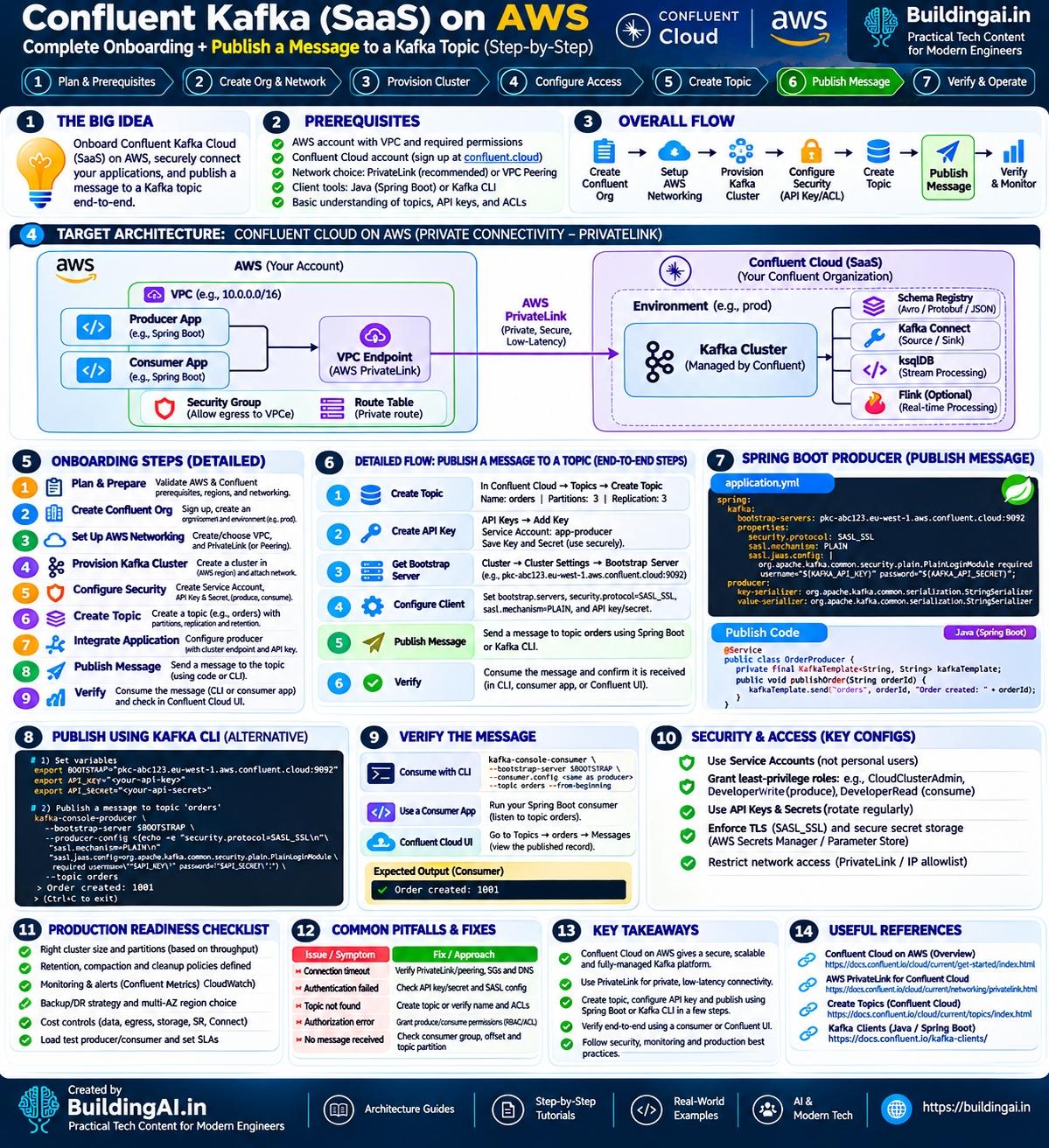
13. Onboarding Confluent Cloud on AWS: prerequisites and flow
The second infographic covers the practical side: stand up Confluent Cloud on AWS, connect an application privately and publish a message.